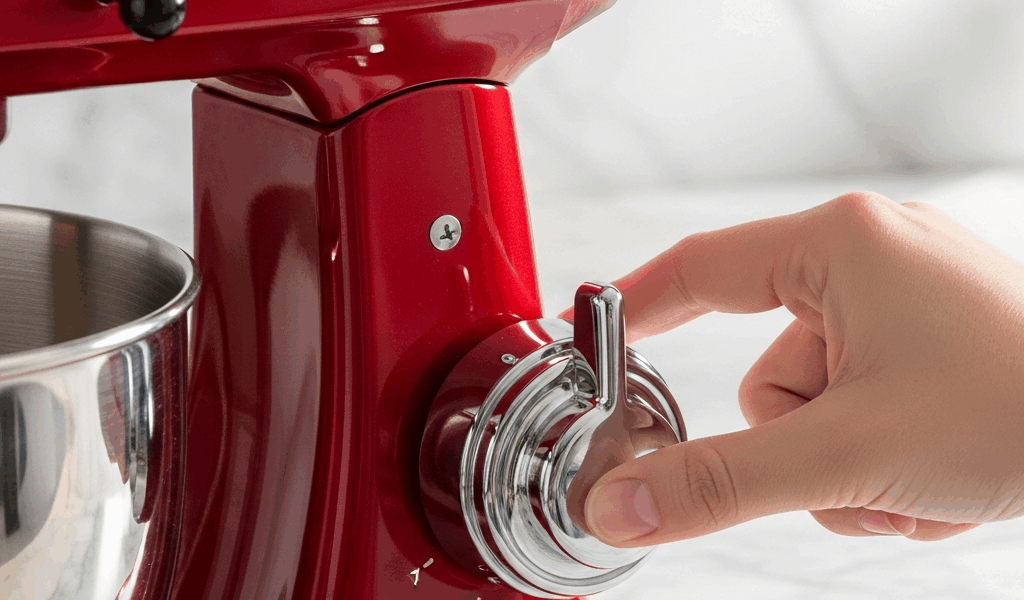
If your KitchenAid mixer speed control is not working — the lever is stuck, the mixer only runs on certain speeds, or it jumps from low to high with nothing in between — you can usually diagnose the problem in under a minute without opening the mixer.
Three Things to Check Before Opening Your Mixer
These take no tools and rule out the most common causes.
1. Toggle the speed lever through all 10 positions slowly. Move it from Off to Stir to 2, all the way up to 10, one click at a time. If it feels gritty, catches at certain spots, or skips from speed 2 directly to speed 6, the speed control plate contacts are dirty or worn. This is the most common cause and it is fixable.
2. Check which speeds actually work. This tells you what is wrong:
- Only low speeds work (Stir through 4), high speeds do nothing — likely a worn speed control plate or dirty contact points.
- Only high speeds work, low speeds do nothing — less common, usually means the low-speed contacts on the control plate are burned or corroded.
- Lever moves but no speeds work at all — could be a thermal overload trip or a failed motor connection. Try step 3 first.
3. Unplug, wait 15 minutes, try again. KitchenAid mixers have a built-in thermal overload protector. If the motor overheated (common after long mixing sessions or heavy dough), it shuts off and needs time to cool. After 15 minutes unplugged, plug it back in and test. If it works, the motor overheated — not a speed control problem.
Speed Control Problems by KitchenAid Model Type
This is where it gets a little annoying. KitchenAid makes two fundamentally different mixer designs, and they use different speed control mechanisms. The fix that works on one type will not work on the other.
Tilt-Head Models
These are the most common home kitchen mixers. The speed control uses a sliding contact plate inside the motor housing.
| Model | Name | Bowl Size | Speed Control Type |
|---|---|---|---|
| KSM150PS | Artisan | 5 qt | Sliding contact plate |
| K45SS | Classic | 4.5 qt | Sliding contact plate |
| KSM3311X | Artisan Mini | 3.5 qt | Sliding contact plate |
| KSM75 | Classic Plus | 4.5 qt | Sliding contact plate |
The speed control plate part number for all tilt-head models is WPW10119326 (replaces older part numbers W10119326 and AP6015292). This single plate fits the Artisan, Classic, Mini, and Classic Plus. Cost is $10 to $18 depending on the supplier.
Bowl-Lift Models
These are the larger, heavier professional-style mixers. They use a different speed control assembly with a multi-position switch rather than a sliding plate.
| Model | Name | Bowl Size | Speed Control Type |
|---|---|---|---|
| KP26M1X | Professional 600 | 6 qt | Multi-position switch |
| KGH25HOX | Pro HD | 5 qt | Multi-position switch |
| KSM8990 | Commercial | 8 qt | Multi-position switch |
Bowl-lift speed control failures are less common because the switch mechanism is more robust. When they do fail, the entire switch assembly typically needs replacement. Part numbers vary by model — check your model number on the KitchenAid parts site or eReplacementParts.com.
How to Fix a Stuck or Stiff Speed Lever
This is the most common speed control complaint by far, and the one I have dealt with personally on a K45SS that sat in a cabinet for about six months between holiday baking sessions. The lever feels stiff, gritty, or will not stay in position. The cause is almost always dried grease or food particles that worked their way into the speed control slot.
What you need: Electrical contact cleaner spray (CRC QD Electronic Cleaner or similar, available at any hardware store for about $8), a can of compressed air, and food-safe lubricant (white lithium grease or food-grade silicone).
Step-by-step:
- Unplug the mixer.
- Tilt the motor head back (tilt-head models) to access the underside where the lever mechanism enters the housing.
- Spray a short burst of electrical contact cleaner into the slot where the speed lever slides. Work the lever back and forth through all positions while spraying.
- Use compressed air to blow out any loosened debris.
- Apply a very small amount of food-safe lubricant to the lever pivot points. A toothpick-sized amount is enough — too much attracts dust.
- Work the lever through all positions several times. It should feel noticeably smoother.
Whole thing takes about 5 minutes. Resolved my sticky-lever problem completely and the mixer has been fine for months since.
Speed Control Plate Replacement
If cleaning the lever mechanism did not fix it — the mixer still skips speeds, only works on some speeds, or the lever moves freely but speeds do not change — the speed control plate itself is worn.
The speed control plate is a small copper-and-fiber board inside the motor housing that the lever slides across. Each speed position has a set of copper contact points. Over years of use, these contacts wear down, corrode, or burn from electrical arcing.
Part: WPW10119326 (fits all KitchenAid tilt-head stand mixers). Available from Amazon, eReplacementParts.com, and PartSelect. Cost is $10 to $18.
Replacement steps:
- Unplug the mixer.
- Remove the single screw on the back of the motor housing (Phillips head).
- Carefully separate the motor housing — on most tilt-head models, the back plate lifts off or the top cap pops off with gentle prying. Do not force it.
- Locate the speed control plate — it sits directly behind the speed lever and has visible copper contact strips.
- Note the orientation before removing the old plate. Take a photo.
- Remove the old plate (usually held by 2 small screws) and install the new one in the same orientation.
- Reassemble the housing and test.
Total time is about 15 minutes. No special tools beyond a Phillips screwdriver.
When to Send It for Service vs DIY
Use this decision framework to figure out whether your speed control problem is a 5-minute fix or a service-center job.
| Symptom | Likely Cause | Fix | Cost |
|---|---|---|---|
| Lever is stiff or gritty | Dried grease or debris in lever slot | Clean with contact cleaner (5 min DIY) | $8 for cleaner |
| Lever moves but skips speeds | Worn speed control plate contacts | Replace control plate (15 min DIY) | $10 to $18 for part |
| Lever flops loosely, no resistance | Loose control plate screws | Tighten screws (2 min DIY) | Free |
| No speeds work, motor dead silent | Thermal overload or blown fuse | Wait 15 min (thermal) or service center (fuse) | Free or $50 to $100 service |
| Motor hums but does not spin | Stripped worm gear | Authorized service center | $80 to $150 service |
| Burning smell from motor housing | Motor winding failure | Authorized service center — or replace the mixer | $100+ service or new mixer |
For worm gear or motor problems, KitchenAid’s authorized service network is the right path. Find your nearest service center at KitchenAid’s website under Support. Many service centers offer flat-rate repair pricing for stand mixers.
One more thing worth checking: if your mixer is under warranty (1 year for household use from the original purchase date), contact KitchenAid directly before paying for anything. Speed control plate wear from normal use is typically covered, and a lot of people do not realize their mixer is still within that window.



Stay in the loop
Get the latest home cuisine delights updates delivered to your inbox.